
Do Not Leave the Door Open:
Protecting Your Mobile and Laptop from Modern Cyberattacks:
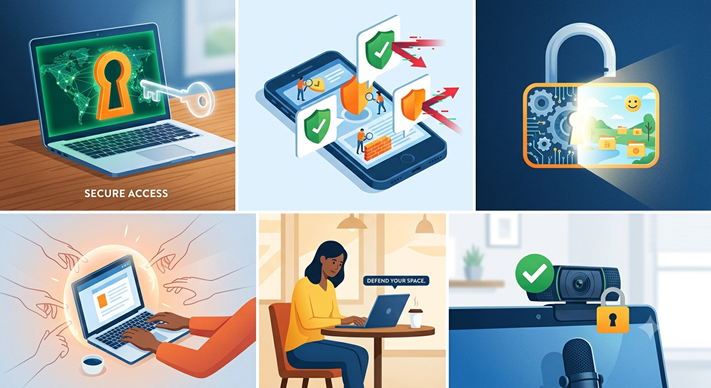 A cyberattack rarely begins with a dramatic warning. More often, it starts with one ordinary action: clicking a link, installing an unverified application, approving an unexpected login request, or connecting a laptop to an unsafe network.
Our mobile phones and laptops now contain nearly everything about us—banking information, photographs, identity documents, business files, confidential emails, passwords and private conversations. For criminals, these devices are not merely machines; they are entry points into our personal lives and professional organizations.

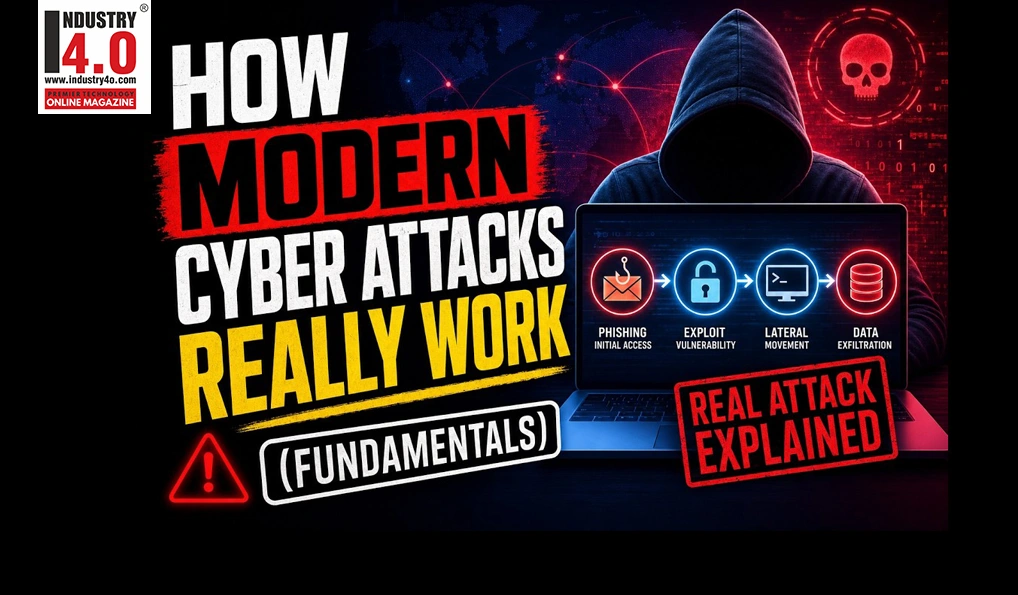
The danger is increasing because attackers have become more patient, convincing and technically advanced. Recent campaigns have used phishing, fake CAPTCHA pages,QR-code lures, stolen session tokens, device-code scams and remote-management tools to bypass traditional security controls. In one 2026 threat report, device-code phishing increased fifteenfold while voice-phishing attacks doubled
Cybersecurity is therefore not only an IT department’s responsibility. It is a daily habit for every employee, business owner, student, professional and family member.
1. The Human Mistake Hackers Need:
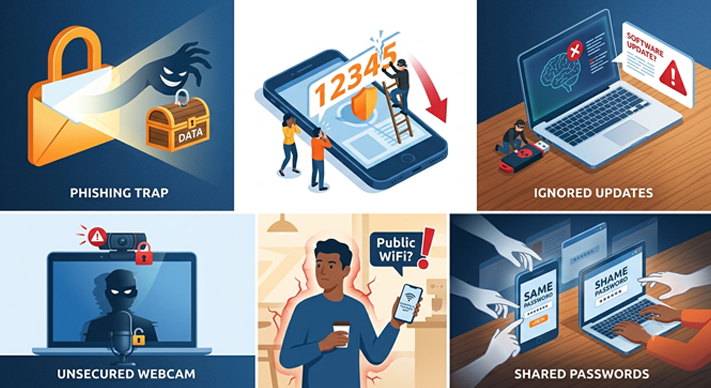 Most attacks do not require a criminal to break through a sophisticated firewall. They need a person to make one rushed decision.
2. Common mistakes include:
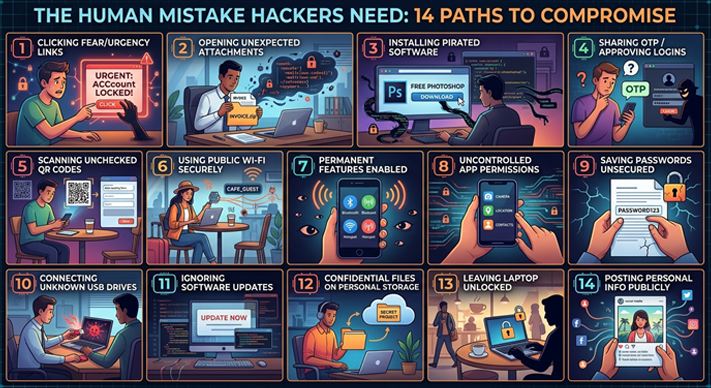 – Reusing the same password for email, banking, social media and office accounts.
– Clicking links in messages that create fear or urgency.
– Opening unexpected invoices, delivery notices or job-related attachments.
– Installing pirated software, cracked applications or unofficial browser extensions.
– Sharing one-time passwords or approving an unfamiliar login notification.
– Scanning QR codes without checking where they lead.
– Using public Wi-Fi for banking or confidential office work.
– Leaving Bluetooth, hotspot or device-sharing features permanently enabled.
– Allowing every mobile application to access contacts, photographs, microphones or location.
– Saving passwords in unsecured notes, spreadsheets or chat messages.
– Connecting unknown USB drives to a personal or company computer.
– Ignoring operating-system and application updates.
– Using personal email or cloud storage to transfer confidential company files.
– Leaving a laptop unlocked at home, in an office, airport or meeting room.
– Posting travel plans, workplace details or personal information publicly.
Each action may seem harmless. Together, they can create an open door.
 3.How Attackers Are Entering Devices:
* Phishing and spear-phishing:
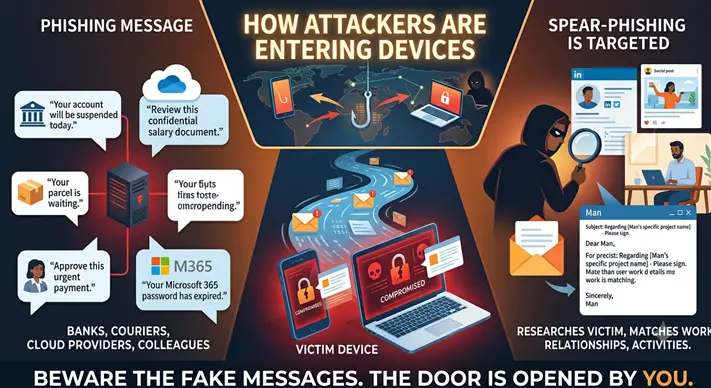 A phishing message may appear to come from a bank, manager, courier, cloud-service provider or colleague. Spear-phishing is more targeted: the criminal researches the victim and creates a message that matches their work, relationships or current activities.
The message may say:
– “Your account will be suspended today.”
– “Review this confidential salary document.”
– “Approve this urgent payment.”
– “Your parcel is waiting.”
– “Your Microsoft 365 password has expired.”
Attackers frequently exploit urgency because urgency reduces careful thinking. CISA identifies phishing as a primary delivery method in ransomware campaigns and recommends multifactor authentication, particularly for email, VPNs and critical systems.
Protection: Do not use the link in an unexpected message. Open the official application or type the website address yourself. Confirm financial or sensitive requests through a second, trusted channel.
4. Fake CAPTCHA and “ClickFix” attacks:
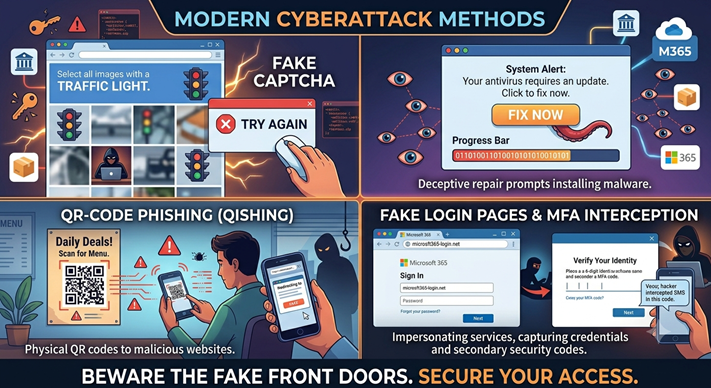 One of the newer tricks is a fake CAPTCHA. Instead of simply asking you to identify images, the page instructs you to press keyboard shortcuts, paste text or run a command. That action may execute malware on the computer.
The U.S. Federal Trade Commission has warned that fake CAPTCHA pages can persuade users to run hidden commands, allowing criminals to steal email credentials, banking information and other data.
 Attackers have also used “ClickFix”-style pages that display a fake browser, system or security error and tell the user to copy a command to “repair” the problem. Recent threat reporting described ClickFix as a major delivery technique affecting multiple operating systems. [reliaquest](https://reliaquest.com/blog/threat-spotlight-whats-trending-top-cyber-attacker-techniques-march-may-2026)
Protection: A legitimate CAPTCHA does not ask you to open a command window, paste an unknown command or disable security controls. Close the page immediately. Never paste commands into PowerShell, Terminal or the Run dialog unless you fully understand them and have verified the instruction.
5. QR-code phishing:
A QR code can hide the true destination. A code placed in an email, PDF, poster or message may lead to a fake login page designed to steal passwords and MFA codes.
QR-code phishing has increasingly been used against cloud-service and Microsoft 365 users, sometimes combined with techniques intended to bypass multifactor authentication.
Protection: Treat unexpected QR codes as links. Preview the destination before opening it, check the domain carefully and avoid logging in through a QR code received unexpectedly.
6. Fake login pages and MFA interception :
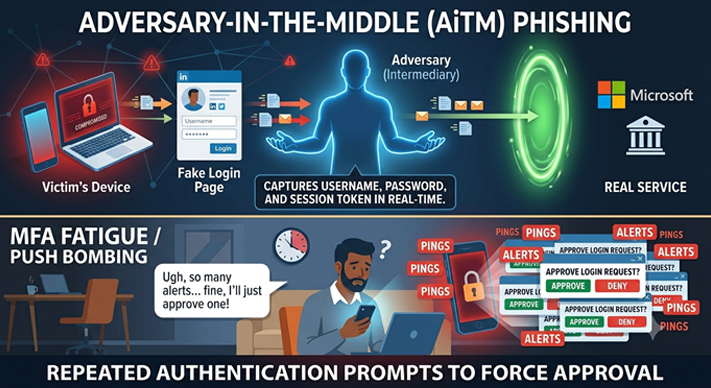
Some phishing websites act as a live intermediary between the victim and the real service. They capture the username, password and authentication session as the victim logs in. This is known as adversary-in-the-middle phishing.
Other criminals send repeated authentication prompts until a tired or confused user approves one. This is called MFA fatigue or push bombing.
 Protection:
– Reject login prompts you did not initiate.
– Report repeated prompts to your IT or security team.
– Check the domain name before entering credentials.
– Prefer passkeys or hardware security keys where available.
– Never share an authentication code with anyone by phone, email or chat.
MFA is highly valuable, but phishing-resistant methods such as security keys and passkeys provide stronger protection than weaker options.
7. Device-code phishing:
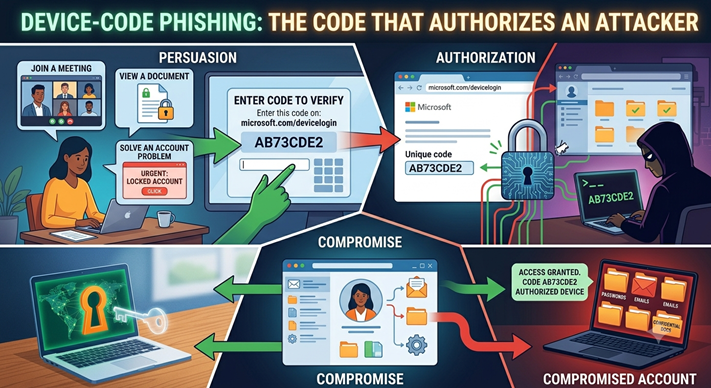 In device-code attacks, a criminal persuades a victim to enter a code on a legitimate login website. The code may actually authorize the attacker’s device to access the victim’s account.
This can look like an invitation to view a document, join a meeting or solve an account problem.
Protection: Never enter a device code unless you personally initiated the login and understand exactly which service is requesting it. If an unexpected person asks you to read out a code, end the conversation.
8. Malicious applications and browser extensions:
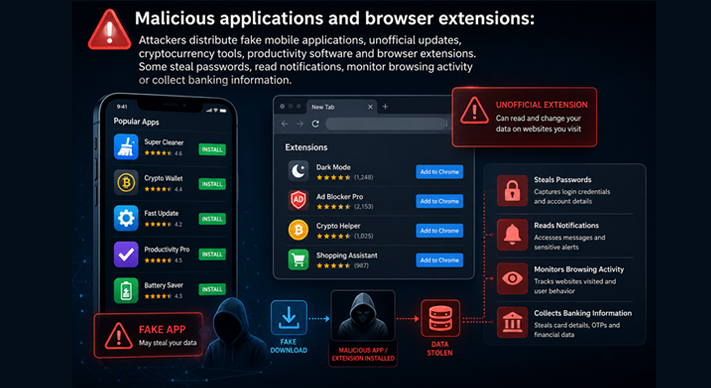 Attackers distribute fake mobile applications, unofficial updates, cryptocurrency tools, productivity software and browser extensions. Some steal passwords, read notifications, monitor browsing activity or collect banking information.
Protection: Install applications only from official stores and use the developer name, reviews and permissions as warning signs. Remove applications you no longer need. Keep the number of browser extensions low and review them regularly.
9. Remote-access scams:
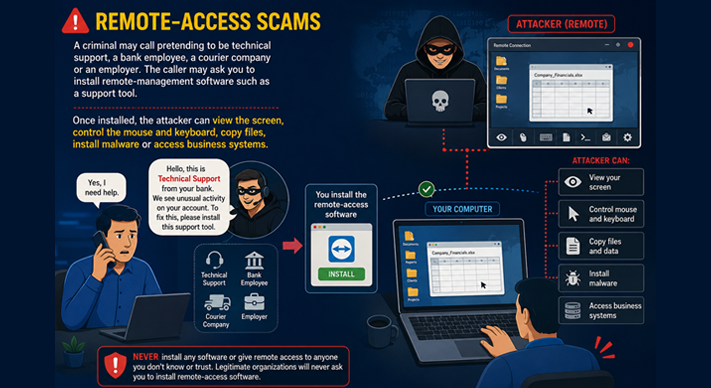 A criminal may call pretending to be technical support, a bank employee, a courier company or an employer. The caller may ask you to install remote-management software such as a support tool.
Once installed, the attacker can view the screen, control the mouse and keyboard, copy files, install malware or access business systems.
Protection: No legitimate support person should pressure you to install remote-control software without an independently verified support process. If remote access is genuinely required, start the session through your organization’s official help desk and end it immediately afterward.
10. Stolen sessions and browser data:
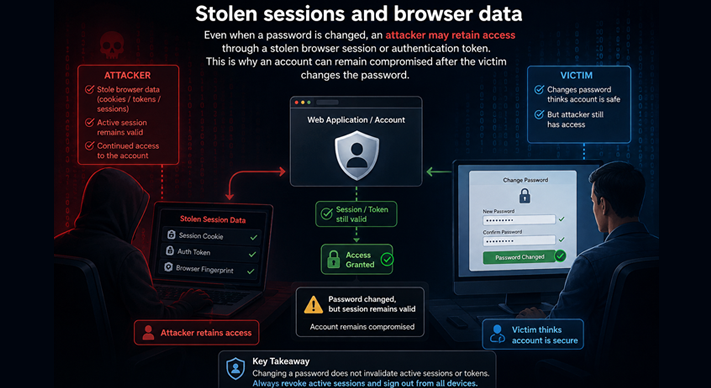 Even when a password is changed, an attacker may retain access through a stolen browser session or authentication token. This is why an account can remain compromised after the victim changes the password.
Protection: Sign out of all sessions after a suspected compromise, revoke unknown devices and applications, change passwords from a clean device and contact the organization’s administrator. Do not assume that changing only one password ends the intrusion.
11. Unpatched systems and exposed services:
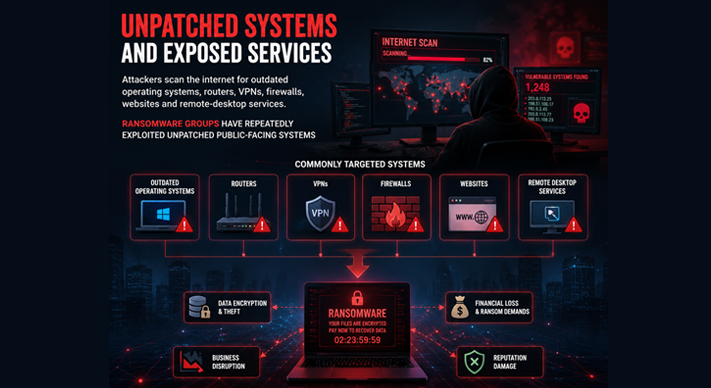 Attackers scan the internet for outdated operating systems, routers, VPNs, firewalls, websites and remote-desktop services. Ransomware groups have repeatedly exploited unpatched public-facing systems.
Protection: Enable automatic updates, replace unsupported devices and ensure that business systems are patched promptly. Remote desktop and administrative services should not be exposed directly to the public internet without strong controls.
Personal Device Protection:
Every individual should establish a basic security routine:
1. Use a long, unique password for every important account.
2. Store passwords in a reputable password manager rather than in notes or spreadsheets.
3. Enable MFA for email, banking, cloud storage, social media and work accounts.
4. Choose passkeys or a physical security key when available.
5. Install operating-system and application updates promptly.
6. Lock the screen with a strong PIN, password or biometric protection.
7. Enable device encryption, remote tracking and remote wiping.
8. Back up important photographs and documents using a secure, separate location.
9. Review application permissions and remove unnecessary access.
10. Keep financial and identity documents out of unsecured messaging groups.
11. Avoid conducting sensitive transactions on unknown public Wi-Fi.
12. Set a PIN and additional security controls on your mobile-carrier account to reduce SIM-swap risk.
13. Do not click links merely because they came from a known contact; that contact’s account may be compromised.
14. Use reputable security software and keep its protection active.
15. Teach children and older family members to recognize urgent or suspicious messages.
A backup is especially important against ransomware. It should be protected from ordinary user access where possible; otherwise, ransomware may encrypt the backup along with the original files.
Professional Device Protection:
Organizations must assume that both technology and human behavior can fail. Good security therefore uses several layers:
– Separate personal and professional accounts.
– Do not use personal cloud storage for official documents.
– Apply least privilege: employees should receive only the access required for their duties.
– Use centrally managed endpoint protection and device encryption.
– Require MFA for email, VPN, administrative tools and cloud applications.
– Maintain tested offline or immutable backups.
– Patch laptops, servers, routers, VPNs and firewalls on a defined schedule.
– Disable unused accounts promptly when staff leave or change roles.
– Train employees with practical examples rather than fear-based lectures.
– Establish a simple process for reporting suspicious emails, lost devices and accidental clicks.
– Monitor unusual logins, mass file downloads and unexpected data transfers.
– Segment critical systems so that one compromised laptop cannot expose the entire organization.
– Test incident-response and business-continuity plans before an emergency occurs.
Security training should not blame employees. A person who reports a suspicious click immediately gives the organization a chance to contain the incident. A person who hides it may allow attackers to move through the network undetected.
What to Do After a Suspicious Event
If you believe a device or account has been compromised, act quickly:
1. Disconnect the device from Wi-Fi, mobile data, Bluetooth and wired networks.
2. Do not continue logging in or experimenting with suspicious software.
3. Contact your organization’s IT or incident-response team.
4. From a separate, trusted device, change the most important passwords.
5. Revoke active sessions and remove unknown devices and applications.
6. Contact your bank immediately if financial information may be exposed.
7. Preserve suspicious messages, phone numbers, screenshots and filenames.
8. Do not pay or negotiate with an attacker without professional and legal guidance.
9. Report the incident to the relevant authorities and service providers.
10. Restore the device only after it has been examined, cleaned or securely reset.
If ransomware appears, do not automatically shut down every system without following the organization’s incident plan. Disconnecting affected systems can limit spread, but the response should also preserve useful evidence and protect unaffected backups. If you don’t have plan ask the experts like ETSPL or Dr. Vinod Gokakakar.
Guidance from Dr. Vinod Gokakakar (Founder & CEO of ETSPL, Consult Innservices)
Through ETSPL, Dr. Vinod Gokakakar’s cyber-consulting approach can help individuals and organizations turn cybersecurity from a vague concern into a practical daily discipline.
The guidance should focus on:
– Identifying the devices, accounts and information that matter most.
– Assessing personal, family and workplace cyber risks.
– Reviewing passwords, MFA, backups, permissions and software updates.
– Teaching people how to recognize phishing, fake support calls and social engineering.
– Building secure policies for personal devices used for professional work.
– Reviewing remote work, cloud storage, Wi-Fi and mobile-security practices.
– Creating a clear plan for lost devices, suspicious messages, malware and ransomware.
– Conducting regular awareness sessions and security assessments.
– Helping organizations improve access control, endpoint protection and incident response.
– Providing calm, confidential assistance after a suspected cyber incident.
The purpose of consultation is not to make people afraid of technology. It is to help them use technology confidently without ignoring the small weaknesses that criminals look for.
The Final Check Before You Click
Before opening a link, approving a login, installing an application or sharing information, pause and ask:
– Was I expecting this?
– Who is really asking?
– Is there unusual urgency?
– Does the website address look correct?
– Am I being asked for a password, code or remote access?
– Can I verify this request independently?
– What would happen if this information reached a criminal?
That short pause can prevent a major incident.
Dr. Vinod Gokakakar Thought on Cybersecurity:
Cybersecurity is not a one-time installation or a promise that attacks will never happen. It is a continuing practice of updating, verifying, backing up, limiting access and reporting problems early. Your phone and laptop are valuable gateways to your life and work—so do not leave the door open.
About the Author :
Dr. Vinod Gokakakar
MD & CEO,
EBC TECH SERV PVT LTD (ETSPL)

Dr. Vinod Gokakakar is a cybersecurity strategist and technology leader focused on ransomware defense, digital trust, enterprise resilience, and advanced threat protection.
Dr. Vinod Gokakakar is a seasoned IT professional with over 21 years of diverse experience in the technology industry. Throughout his career, Dr. Vinod Gokakakar has worked with a wide range of sectors, from small businesses to multinational corporations, gaining invaluable insights into various technological verticals.
In 2017, leveraging his extensive expertise and recognizing the growing importance of cybersecurity for businesses, Dr. Vinod Gokakakartook a bold step and established his own company. Focused on serving small and medium-sized enterprises (SMEs), his company aimed to provide comprehensive cybersecurity solutions to protect these businesses from emergin threats in the digital landscape. Dr. Vinod Gokakakar‘s commitment to safeguarding the digital assets of SMEs earned him a reputation as a trusted advisor in the cybersecurity domain.
Building on his success and driven by a passion for addressing complex challenges in the digital realm, Dr. Vinod Gokakakar expanded his entrepreneurial ventures further. In 2017, he founded ETSPL dedicated to providing a comprehensive suite of services encompassing cybersecurity, legal advisory, copyrights, intellectual property rights (IPR), online dispute resolutions, and more. This innovative venture positioned Dr. Vinod Gokakakar as a pioneer in offering integrated solutions that bridge the gap between technology and legal compliance.
Dr. Vinod Gokakakar‘s visionary leadership and multidisciplinary approach have positioned his companies as leaders in the cybersecurity and legal services sectors in India. His ability to anticipate emerging trends, coupled with a deep understanding of both technology and legal frameworks, has enabled him to offer holistic solutions tailored to the evolving needs of his clients.
With a track record of success and a commitment to excellence, Dr. Vinod Gokakakar continues to make significant contributions to the advancement of cybersecurity and legal services, empowering businesses to navigate the complexities of the digital age with confidence and resilience.
Dr. Vinod Gokakakar is Bestowed with the following Licenses & Certifications :
https://www.linkedin.com/in/vinodgokakakar/details/certifications/
Dr. Vinod Gokakakar is Accorded with the following Honors & Awards :
https://www.linkedin.com/in/vinodgokakakar/details/honors/
Dr. Vinod Gokakakar can be contacted at :
Are you an IT Professional? Visit FreePikTool website.
About EBC TECH SERV PVT LTD (ETSPL):
 EBC TECH SERV PVT LTD (ETSPL) is a Managed IT Services Provider offering IT Advisory and Leadership Services to organizations in India.
EBC TECH SERV PVT LTD (ETSPL) offer value-driven solutions above and beyond managing and operating hosting, security and a full range of IT support services.
EBC TECH SERV PVT LTD (ETSPL) IT Advisory approach enables us to provide leadership to our clients in a complex rapidly changing IT environment.
EBC TECH SERV PVT LTD (ETSPL) focus is to provide maximum “business value” to clients enabling them to grow their businesses, manage their risk/compliance, and increase their competitive position by delivering improved business results.
EBC TECH SERV PVT LTD (ETSPL) client-first approach means our solutions are based on what technology solutions are needed to “fuel” their business, not a particular hardware or hosting solution.
Mission of EBC TECH SERV PVT LTD (ETSPL) :
The mission at EBC TECH SERV PVT LTD (ETSPL) is to add value and to contribute to clients’ long term success and competitive strength. This is accomplished by helping clients to identify solutions that improve performance, by assisting in implementing those solutions and by aiding in managing the subsequent change.
EBC TECH SERV PVT LTD (ETSPL) can be contacted at:
FaceBook | LinkedIn | YouTube | Website | E-mail
About CONSULT INNSERVICES :


conduct training sessions for employees, reporting, resolving client issues, software testing, troubleshooting issues and developing innovative solutions that will drive growth.
CONSULT INNSERVICES can be contact at:
Also read Dr. Vinod Gokakakar‘s earlier article :